
Fill the pipeline
Vera builds this week's list from the customers you already have, drafts the first message in your tone, and holds all of it until you approve. After that she follows up, and tells you which deals need you today.
Vera Brandt fills your pipeline. She finds companies like the customers you already won, picks the right person at each one, and writes to them in your tone until they answer.
 Vera Brandt
Sales representative
Vera builds this week's list from the customers you already have, drafts the first message in your tone, and holds all of it until you approve. After that she follows up, and tells you which deals need you today.
Vera starts where the next deal is closest: the accounts you already won. Then she finds the new ones, and tells you exactly what it takes to hit the number.
01
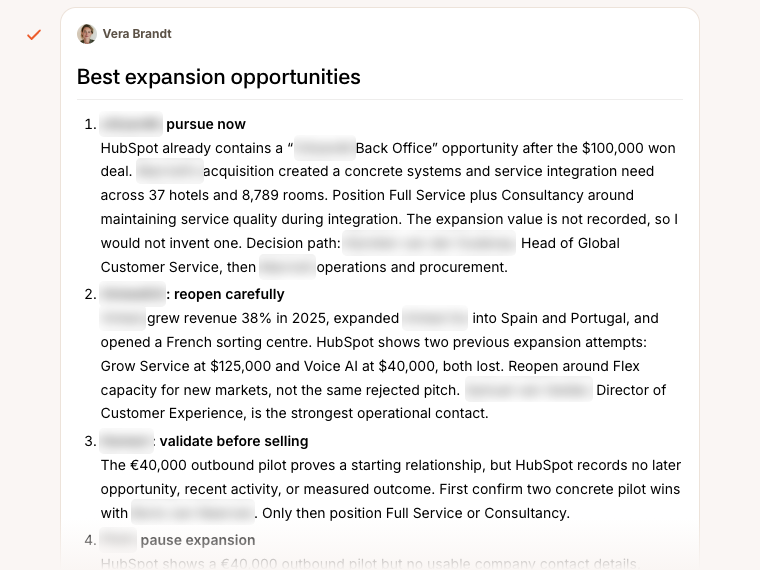
Vera goes through an account the way a good account manager would: what they buy today, what companies like them buy as well, and who to talk to. You get the cross-sell and upsell she would chase, with the reason for each.
02
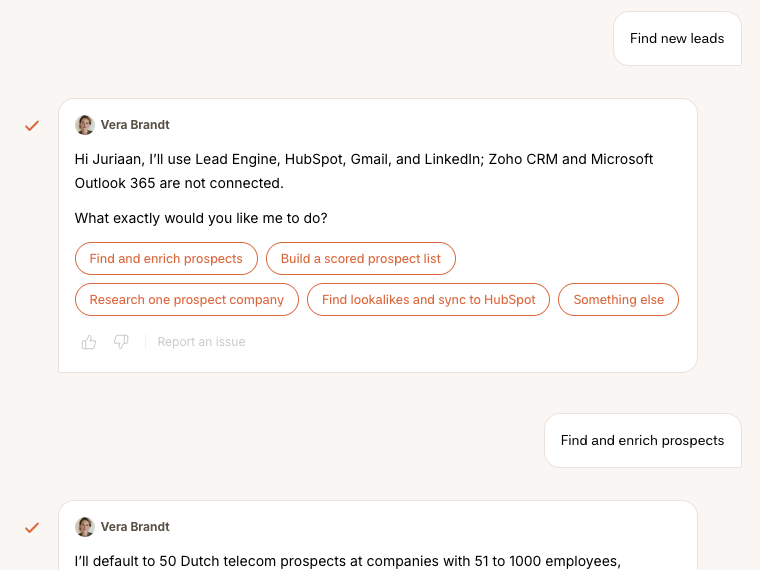
Vera finds the companies and people that fit, scores them and enriches them with verified work emails. Lead generation is built into Firestarter, so there is no data provider to connect and no extra subscription to pay for.
03
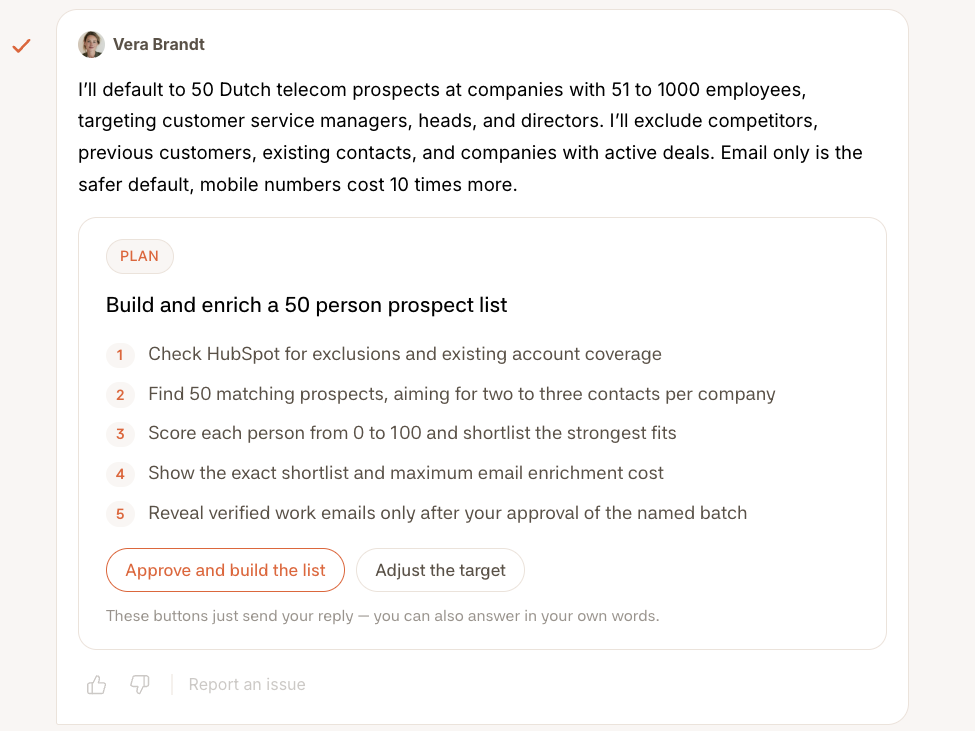
Vera works back from your target and shows what she will do next: who she will look for, how she will score them and what the enrichment will cost. You approve the plan or adjust the target, and she gets to work.
You do not brief Vera every week. Vera reads the same numbers you do, and when they move the wrong way the proposal is already written when you open the app.
Noticed
Pipeline is behind plan for the quarter, and the three largest deals have not moved in eleven days.
Proposes
A re-engagement campaign to the 140 customers who went quiet, written in your tone, sent over four days.
You approve
She sends it in batches, logs every reply in the CRM, and flags the conversations that need you.
It waits there until you approve it.
And what Vera never does on her own. Nothing leaves your domain before you have read a sample and approved the batch.
Owns
Pipeline
The list, the first message, the follow-up, and the state of every deal in the CRM.
Hands you
Fifty prospects, every week
With the person to write to at each one, and the reason each of them fits.
Everything Vera can do, grouped by the job it is for. Ask in your own words: she picks the right skill.
You approve first marks the work that sends, books or changes something outside Firestarter. Nothing like that happens until you say yes.
01
Who to write to, and why each one fits.
Find companies like your best customersYou approve first
She reads what your won deals have in common, finds look-alikes in the built-in Lead Engine with the reason each one fits, and adds the ones you pick to your CRM.
Sharpen who your ideal customer is
Drawn from your won and lost deals, reply rates and website visits, not from a guess.
Research a company before you reach out
One page: what they do, what changed lately, and who to talk to.
Spot the companies that are ready to buy
The signals in their activity that say now is the moment to write.
Find markets you are not in yet
Gaps and trends worth a closer look, with the evidence for each.
Fill in missing emails and numbersYou approve first
The gaps on your CRM contacts filled in and verified, so nothing bounces.
Know when people change jobsYou approve first
New leaders at the companies you target, and where your contacts moved to, checked against their work history.
Find people whose email bouncedYou approve first
Where they work now, so you can write to them again.
Find out who is behind an email addressYou approve first
The person and company behind an address that wrote to you, added to your leads.
See who a competitor hires and loses
Their team by department, the new leaders and the people who left, for an account or competitor brief.
02
The first message, the follow-up, and every reply.
Run a cold email campaignYou approve first
The list, the emails and the pace, set up with you step by step before anything is sent.
Run a LinkedIn campaignYou approve first
Connection requests and messages in small batches, inside LinkedIn's weekly limits.
Plan email and LinkedIn as one sequence
Which channel, which day and which message, for every step.
Answer the repliesYou approve first
She reads every reply, drafts the answer in your voice, and stops writing to anyone who asked her to.
Check how your campaigns are doingYou approve first
Delivery, reply rate and the quality of the replies, with the fix for whatever is off, applied once you pick it.
Test two versions of a message
A clean A/B test, and what the winner means for the next one.
Write or send a single emailYou approve first
One message for one person, tailored to them, from your own inbox.
03
Everything around the meeting, so you walk in ready.
Prepare you for a meeting
Who is in the room, the deal so far, and what to ask.
Write the follow-up
After a meeting or a quiet week, in the tone of the mail you already send.
Draft a proposal
A first version built from what the customer told you.
Handle the objections you keep hearing
An answer for each one, in your words, ready for the next call.
Get a second opinion on a stuck deal
What is holding it up, and the next move that could get it going again.
Book, move or cancel a meetingYou approve first
In your own calendar, with the invite sent for you.
Hand a warm lead over
Everything the next person needs to pick it up, in one place.
04
A pipeline you can trust again.
Check the health of your pipeline
Which deals are at risk, and what to do about each, most urgent first.
Clean up your CRMYou approve first
Duplicates, empty fields and deals stuck in a stage, fixed in one go.
Keep contacts, deals and tasks up to dateYou approve first
Notes, stages and next steps written into HubSpot or Zoho for you.
Score your leads
A scoring model built on your own customers, so the best leads rise to the top.
Wake up contacts that went quiet
Who is worth another try, and the message to try with.
05
Renewals, reviews and the next sale.
Know an account inside out
Its history, its people, and who actually decides.
Plan when to get in touch
Touchpoints for your key accounts, spread over the quarter.
Prepare a quarterly review
The numbers, the story and the agenda, ready before the meeting.
Find room to sell more
Which customers are ready for more, and what to offer them.
Find customers who would refer you
Who is happy enough to ask, and how to ask them.
Get renewals signed on time
Every renewal coming up, and a plan for the ones that will be a negotiation.
Keep a customer who is about to leave
The save plan, and who does what until the account is safe.
 Commercial lead Reads everything, executes nothing, and tells you where the plan is off.
  Content marketer Gets you found, in your own voice, week after week.
  Paid ads manager Runs your ads day to day, so you do not need an agency.
  Customer success A person, not an AI, who gets you running and stays with you.
 Add Vera, Noor or Felix when the plan asks for them.